


How do you order tickets?
Useful tips
Three ways
There are three ways to order tickets:
- Through this website: add your shows to your shopping cart.
- By phone: call 056/ 23 98 55
- At the ticket office during the opening hours of Ticketservice (Conservatoriumplein 1, 8500 Kortrijk)
How do I order tickets online?
 As of 27 February 2023, Schouwburg Kortrijk has switched to a new ticketing system: Tixly. We would like to provide you with some information on how to order tickets online using this new platform.
STEP 1: Log in to your personal account or create an account.
To order tickets, you must first be logged in to your account.
- You already have an account.
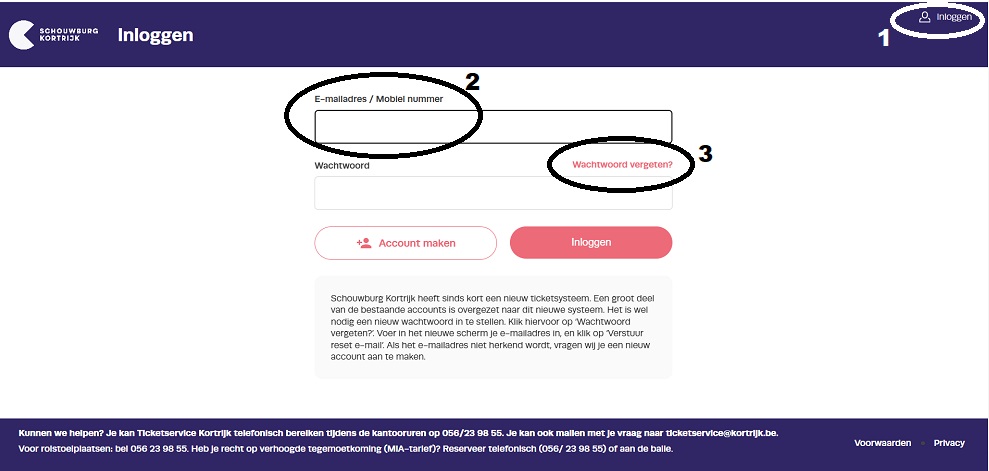
Click ‘Log in’ (1) in the top right corner. Enter your email address (2) and your password.
If you have forgotten your password, you can create a new one. To do this, click ‘Forgot password?’ (3).On the new screen, enter your email address and click ‘Send reset email’. You will receive an email to set a new password.
If the email address is not recognized, we ask that you create a new account. - Create a new account
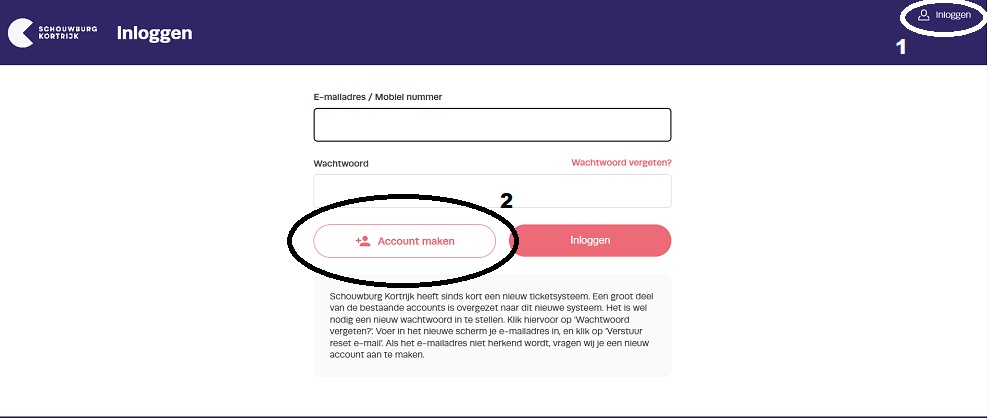
Click ‘Log in’ (1) in the top right corner. A login screen will appear where you can enter your email address and password. You can create a new account by clicking the ‘Create account’ button (2) in the bottom left corner and following the steps in the process.
If you already have an account, simply enter your email address and password and click ‘Log in’.
Once logged in, you can easily start making reservations.
STEP 2: Reservate my ticket(s)
1. Find the performance for which you want tickets.
* Via the schedule
Scroll through the program in our schedule and click 'Tickets' in the top right corner of the performance you wish to see.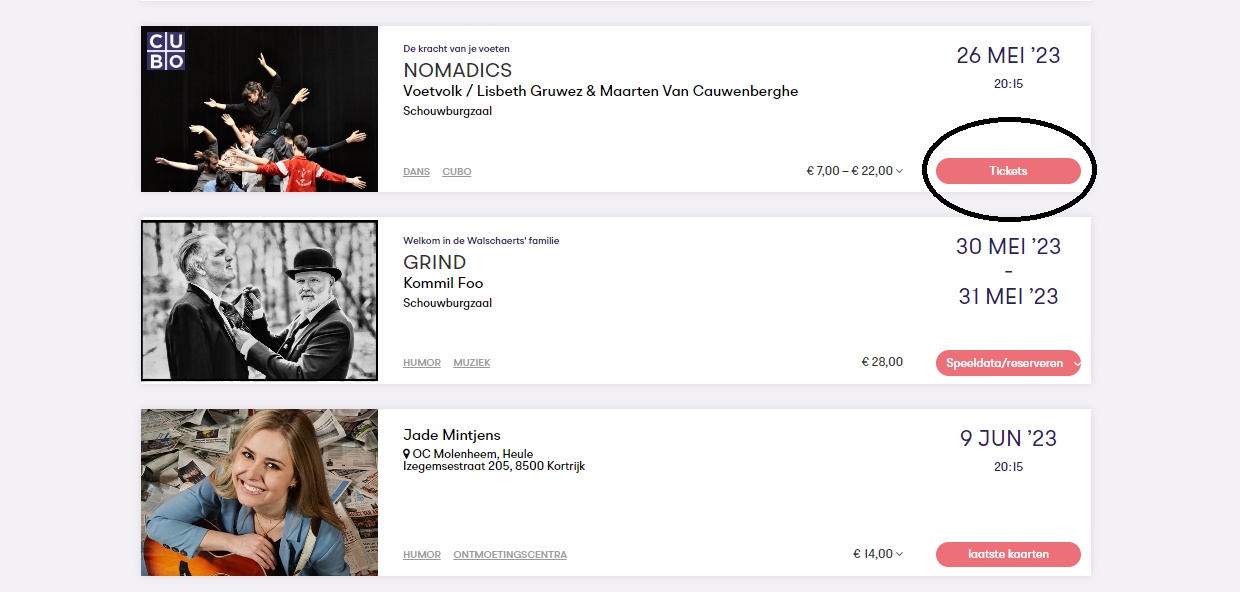
* Via the performance page itself
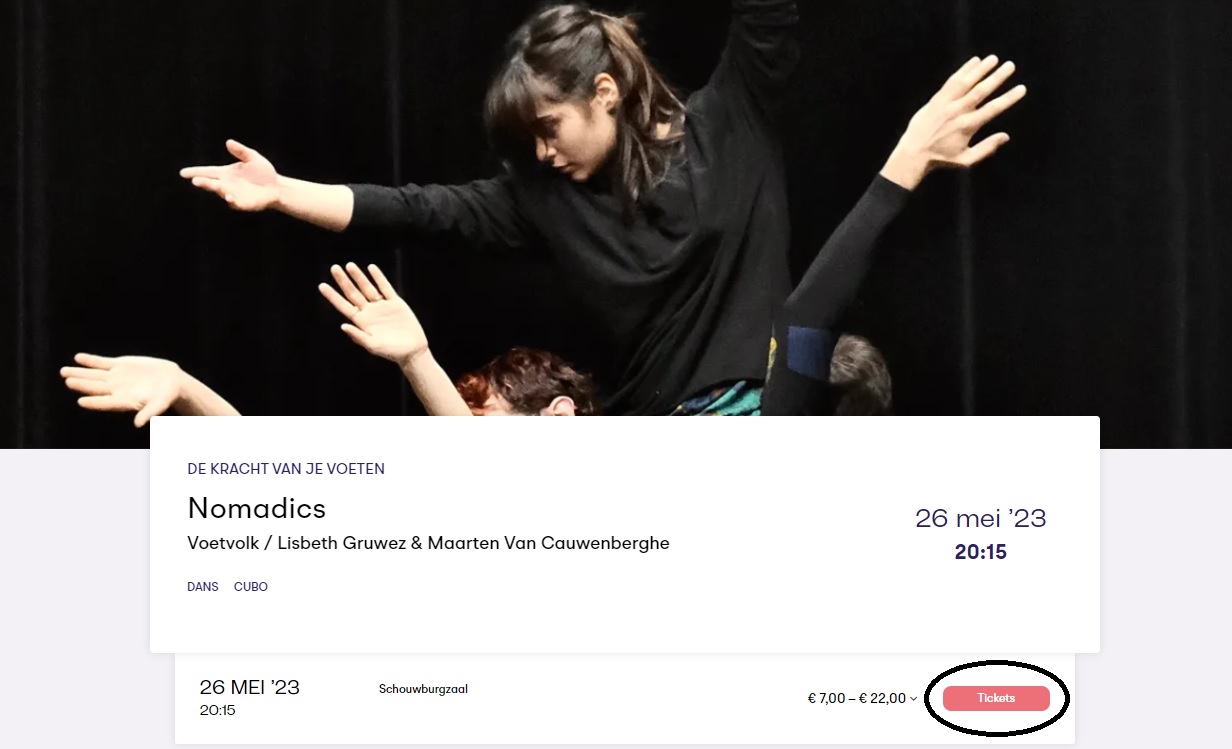
If you are on the performance page itself, click 'Tickets' in the top right corner.
2. The performance I want has either numbered seating or unnumbered seating.
* NUMBERED :
If the tickets are for a venue with reserved seating, you will automatically be directed to the seating plan. Available seats are indicated by unfilled circles. Click on a circle (representing the seat you wish to book). A pop-up window will appear showing the price categories associated with that seat. Click ‘Select’ next to the appropriate price category. Your selected seat will turn black. Repeat this step for any additional seats you need. Once you have reserved the required seats, click ‘Continue’ at the bottom right.
* NOT NUMBERED:
If the tickets are for a venue with unreserved seating, you will be directed to a page where each price category has a section allowing you to use ‘+’ and ‘–’ buttons to select the number of tickets you wish to reserve. Select the required number of tickets for the appropriate price category and then click ‘Find tickets’.
3. You will see an overview of your order
After clicking 'Continue' (for a venue with assigned seating) or 'Find tickets' (for a venue with unassigned seating), you will arrive at an overview screen. Here, you can see a summary of the seats you have reserved. If you wish—and provided the venue has assigned seating—you can review your seat selection on the seating plan or make changes. You can do this by selecting 'View/change seats'.
4. Add to your shopping basket.
After reviewing and - if necessary - adjusting your order summary, click ‘Add to shopping cart’.
The order has been added to your shopping cart, and your (complete) cart is displayed. If you wish to book additional performances, select ‘Continue shopping’ at the bottom left and repeat the process starting from step 2 to book seats for other performances.
If you are satisfied with the order, click ‘Pay’ at the bottom right.
5. Delivery method
After clicking 'Pay' in your shopping cart, you can choose how you wish to receive your tickets. You will be directed to a screen where you can select the delivery method: either as a PDF (e-tickets) or by mail (in which case you select 'Post'; please note that a shipping fee of €1.45 applies).
PLEASE NOTE: delivery by mail is no longer available for events taking place within 7 days.
Once you have selected the delivery method, click 'Continue'.
6. Payment process
Next, you will enter the payment module to finalize your order. You will first see a summary of your order and details.
This includes the shipping method you selected. You can still change this by clicking the ‘Change shipping method’ button on the right.
Below that, you will see your details, which you can also edit or update.
Next, you can select your preferences regarding newsletters and other communications.
Below that, the gift card section appears. Here, you can enter your gift card number and amount, then click ‘Redeem’ to use the gift card to pay for (part of) your order.
Finally, you will see the payment method. You must agree to the terms and conditions before clicking ‘Continue’. You will then be redirected to the payment environment to complete your purchase.
7. You receive your tickets
After checkout, you will receive the tickets via your preferred method (digitally as a PDF or sent by mail).
UiTpas

Schouwburg Kortrijk is a proud UiTpas partner. Anyone who has a UiTPAS can earn points during all performances.
Anyone with a UiTPAS from the South-West region with a reduced rate receives an 80% discount on the ticket price. Reserve your seat online, at Ticketservice Kortrijk via 056 23 98 55 or at the counter (Ticketservice - Conservatoriumplein 1).
European Disability Card

The European Disability Card (EDC) is a free card that promotes access for persons with disabilities to culture, sports, and leisure activities (museums, amusement parks, tourist attractions, sports centers, etc.) and offers a number of benefits in those areas.
For example, wheelchair users, when there are tiers, enjoy the lowest tier price. If holders of an EDC card need a companion, that person can accompany them for free. This applies to all performances managed by the organization. Such tickets can be reserved via email and by phone:
- 056/23 98 55
- Ticketservice Kortrijk
To ensure your order proceeds smoothly, the site needs access to cookies and JavaScript. These must be enabled, and your browser must be up-to-date. This is necessary to remain logged in correctly and to display the seating plans properly on the screen.
Through our 'check' page, you can verify if your browser is properly configured. If everything is correct, you will see a message 'your browser is up-to-date' and three checkmarks.
If your cookies are not enabled, check here how to enable them.